---
title: "Self-hosting"
description: "Run your own openmw-web server from a browser: the Docker quick start, the admin dashboard, mods, Tamriel Rebuilt, updates, multiplayer and static hosting."
book: "Self-hosting"
order: 50
---
This page covers running your own openmw-web server: the Docker quick start, the admin
dashboard page by page, mods, Tamriel Rebuilt, updates, the multiplayer server, and static
hosting without the dashboard.
## Quick start
The whole server, set up from a browser. You need
[Docker](
https://docs.docker.com/get-started/get-docker/) and your own copy of Morrowind:
```bash
git clone
https://github.com/Virtastic/openmw-web.git
cd openmw-web
./setup.sh # Windows: .\setup.ps1
```
1. Unzip the latest `openmw-web-*.zip` from
[Releases](
https://github.com/Virtastic/openmw-web/releases) into `play/` (the engine is
too big for git; the script reminds you if it is missing).
2. Your browser opens **http://localhost/admin**: create the admin account, answer the
wizard, drag your `Data Files` folder in when it asks.
3. Play at **http://localhost**.
That's it. Stuck, or a question this page doesn't answer? Ask in
[Discord](
https://discord.gg/PzFfDkbSue).
Useful afterwards:
```bash
./setup.sh --update # pull a newer version and restart
./setup.sh --stop # stop everything; your data is kept
```
Worth knowing:
- **Single player or multiplayer is the wizard's first question.** Finishing the wizard
restarts the container as the server you chose, and the dashboard follows: a game's
dashboard for single player, the people-first one for the multiplayer server. Change your
mind later from Settings; it restarts the same way.
- **The server supplies the game files** to everyone who plays on it - you upload your
`Data Files` once, in the wizard. Everyone playing still needs to own the game.
- **The address can move when you answer the hosting question.** A fresh server is plain
HTTP; choose *Public* with a domain and it switches to HTTPS with a real certificate,
fetched automatically. The page hands you to the new address itself.
- **A fresh install shows "unhealthy" in `docker compose ps`** until game data is in. That is
expected - the dashboard is up and tells you what is missing.
- **Setting up from another machine** (a VPS over the internet) asks for a **setup key**,
printed in the server log at startup - so a stranger cannot claim `/admin` first. From your
own machine or LAN you are never asked.
- **Locked out?** `docker compose run --rm openmw-web node dist/server.mjs --data /data
--admin-reset <name>` clears the password and two-factor and prints a temporary one.
## The dashboard, page by page
Each page needs a role: **viewer** reads, **moderator** acts on players, **owner** changes
the server. Pages a role cannot use are not shown to it.
| Page | Role | What it is for |
| --- | --- | --- |
| **Overview** | viewer | Uptime, who is on, memory, health |
| **Players & commands** | moderator | Roster, chat, reports, commands. Multiplayer only |
| **Mod manager** | viewer reads, owner changes | Install, order and remove mods (below) |
| **Game files** | viewer reads, owner changes | The base game's files and the upload checklist |
| **Core / Access / Storage / Operations** | viewer reads, owner changes | Every setting, with plain-language help |
| **Accounts** | moderator; owner for roles, deletion, saves | Who exists, their role, their savegames |
| **Admin sessions** | owner | Signed-in dashboard sessions, revocable |
| **My security** | viewer | Your own password and two-factor |
| **Logs / Audit trail** | moderator | What the server did; what administrators did |
| **Updates** | owner | See what is newer, click to update (below) |
| **Maintenance** | owner | Close the doors before big changes. Multiplayer only |
| **Backup** | owner | Download the data folder as `tar.gz`. Restoring is stop, replace, start |
| **Restart** | owner | Restart the server |
Two cautions: **a backup contains secrets** (password hashes, S3 keys - treat the file like a
password), and **`[admin] dashboardToken` is a standing moderator credential** that bypasses
accounts and two-factor; prefer a real account with a role.
The setup wizard is first-run only. Change individual answers under Configuration instead of
re-running it.
### Mods
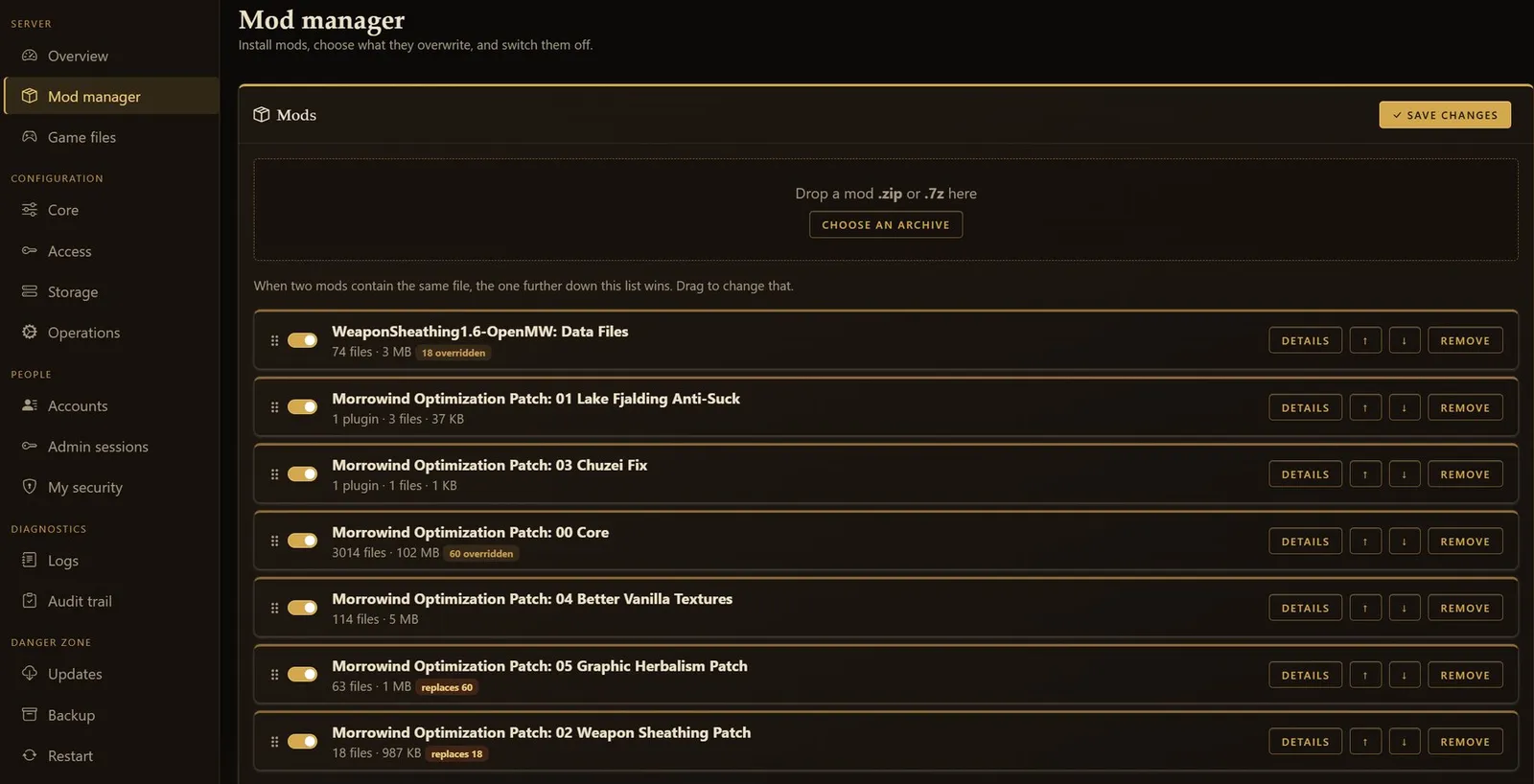
The Mod manager installs mods from an archive - drop a `.zip` or `.7z` on the page. The
server reads what is inside and shows the data folders it found; you tick the ones you want,
because Nexus downloads routinely bundle a core install with optional extras. (RAR is not
supported; re-save it as `.zip` or `.7z`.)
Each mod gets its own folder and a card in the load-order list:
- **Drag to reorder** (or use the arrows). Order is file priority: when two mods contain the
same file, the one further down wins - and the badges saying "replaces N" / "N overridden"
follow the list live as you drag.
- **The switch** takes a mod out of the load order without deleting it.
- **Details** shows what came from where, overlap explanations, and a checkbox per plugin.
- **Remove** deletes the mod's folder. Saves are untouched.
A plugin whose master is not loaded is flagged in red - that one aborts the game at startup,
so fix it before playing. Restart the server after changing mods; the dashboard offers to.
Installs show a real progress bar. A big `.7z` (Tamriel Data is 54,000 files) takes a few
minutes; Back and Skip are disabled while it runs.
### Tamriel Rebuilt
Choose Tamriel Rebuilt on the wizard's content step and it asks for the archives on a step
of its own, after the base game. It is **two** downloads and both are needed:
| Archive | What it is |
| --- | --- |
| Tamriel Rebuilt | The landmass (`TR_Mainland.esm` and friends) |
| Tamriel Data | The meshes, textures and sounds it draws from |
Upload each **as you downloaded it**, without unpacking - the release is recognised by the
file's hash, since release names vary. An unrecognised (newer) release installs the same and
just says it cannot name the version. Parts come ticked except anything that *removes*
vanilla content (TR ships one of those); forgetting the Tamriel Data half is flagged by name
rather than turning into a continent of error markers.
Tamriel Rebuilt is why the engine is 64-bit (wasm64): players need a browser with MEMORY64
support and the RAM to match.
### Updates
The Updates page checks GitHub automatically and shows two things: the **server** you run
and the **game client** players load. Each has its own Update button - checking is
automatic, applying is always your click. Updates never touch the data folder, so accounts,
saves, settings, game files and mods all stay; the cautious can take a backup first.
- **Game client:** the server downloads the release, verifies it against the release
checksums, and swaps it in live. No restart, nobody is interrupted; players get the new
version on their next page load.
- **Server:** a small updater container (part of the Docker stack, no setup) checks out the
newest release tag, pulls that release's prebuilt server image
(`ghcr.io/virtastic/openmw-web-server:<tag>`, the multiplayer-capable build every release
publishes - nothing is compiled on your machine), and restarts the server. The page
follows along and reconnects; the restart signs everyone out for a minute or two.
Installed before updates existed? `./setup.sh --update` (Windows: `.\setup.ps1 -Update`)
adds the updater and the button works from then on. Running without Docker on Linux, also
`chown -R 1000:1000 ./play` so the server may write the client folder. The script remains
the manual fallback and does the same thing as the button.
**Rolling back.** The image a deployment runs is pinned by `OPENMW_WEB_TAG` in `.env`
(the setup script and the updater write it). To go back a release, set it to the previous
tag, then:
```bash
git checkout v1.3.0 # the same tag, so the compose file and Caddy config match
docker compose pull openmw-web && docker compose up -d openmw-web
```
Your data folder is untouched by either direction.
### Savegames
Open an account under **Accounts** to see its saves. A moderator can see the list;
downloading or importing a save is owner-only. It exists so "my save is gone" never needs
shell access.
## Multiplayer server
Multiplayer is a real addition to a single-player game - expect rough edges. Choose it in
the wizard and it walks you through the rest. Three things to know:
1. **The server simulates the world itself** (a headless copy of the engine runs NPCs, so a
modified client cannot author what an NPC did). That is why it must have its own game
data.
2. **One origin.** The game page and the server share a hostname; a separate
`mp.example.com` cannot work. The Docker stack handles this for you.
3. **Sign-in is your choice** - SSO (Google / Discord / Microsoft), passwords, or both. The
wizard collects the keys; creating the OAuth app at the provider is the one thing it
cannot do for you, and [Multiplayer setup](
/openmw/docs/multiplayer-setup/) walks
through it in about five minutes (plus optional S3 storage).
Running without Docker, wiring your own reverse proxy, capacity planning, moderation ranks
and the ops details live in [Advanced hosting](
/openmw/docs/advanced/).
## Static hosting without the dashboard
The release zip is also a self-contained static bundle: unzip it anywhere and run
`python3 server.py` (or double-click `Start openmw-web`). No accounts, no dashboard, no
mod manager - but playable in a minute, and players can point it at their own `Data Files`.
To serve your own Morrowind with it, copy your `Data Files` contents into `mwdata/` next to
`server.py` and run with `OPENMW_LAUNCHER=0`. Files stream on demand over HTTP range
requests; nothing is repacked.
Serving it with your own web server instead? The engine needs **cross-origin isolation** on
every response, over HTTPS (or localhost):
```
Cross-Origin-Opener-Policy: same-origin
Cross-Origin-Embedder-Policy: require-corp
Cross-Origin-Resource-Policy: cross-origin
```
Plus `application/wasm` for `.wasm`, range-request support, and (nice to have) serving the
precompressed `.br` siblings. Caddy:
```caddy
example.com {
root * /srv/openmw-web
header {
Cross-Origin-Opener-Policy same-origin
Cross-Origin-Embedder-Policy require-corp
Cross-Origin-Resource-Policy cross-origin
}
file_server {
precompressed br
}
}
```
nginx and static hosts (Netlify, Cloudflare Pages) work the same way - set those three
headers in the host's config. Static hosts cannot run the multiplayer server.
## Browser support
Desktop Chrome or Chromium, with MEMORY64 (Chrome/Edge 133+). Firefox, Safari and mobile are
not supported.
## Licensing notes for hosts
The bundle is GPLv3 (see [LICENSE](
https://github.com/Virtastic/openmw-web/blob/main/LICENSE),
[NOTICE](
https://github.com/Virtastic/openmw-web/blob/main/NOTICE),
[THIRD-PARTY-LICENSES.md](
https://github.com/Virtastic/openmw-web/blob/main/THIRD-PARTY-LICENSES.md)).
If you host it, link to the source ([the repository](
https://github.com/Virtastic/openmw-web)
or the matching `openmw-web-src-<tag>.tar.gz`) somewhere reasonable - the included pages
already do this in their footers, so leaving them intact is enough. The demo world is
freely-licensed content (see `CREDITS-DEMO-DATA.txt`).
**Morrowind game data is not included and must never be bundled by hosts.** A server
supplies its operator's *own legally-owned* copy to its players, exactly as a player points
the browser at their own `Data Files`; everyone playing still needs to own the game. The
releases and deploy workflows ship no game data, and per-player uploads through the game
launcher stay private to each account, gated by a manifest so the locker stays a backup for
recognised game files rather than general file hosting. The full reasoning is in
[Legal posture](
/openmw/docs/legal/).